


cover image source: Rujukan.my
Calling all Anak Johor and local residents! Dreaming of owning a house but not sure if you qualify for the Rumah Mampu Milik Johor (RMMJ) scheme?
Don’t worry, we’ve broken down the official criteria so you can easily see if you’re eligible to apply. Let’s find out if you’re ready to take the next step!
Johor Affordable Housing & Portal Guide
What is Rumah Mampu Milik Johor (RMMJ)?
Rumah Mampu Milik Johor (RMMJ) is an affordable home scheme provided by the Johor state government, under Projek Rumah Mampu Biaya (Affordable House Project) which aims to benefit low-income groups (B40) in the state of Johor.
What is the Johor Real Estate Portal?
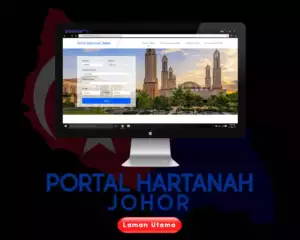
The Office of the Secretary to the Government of Johor (SUKJ) Housing Division has taken the initiative to develop a real estate portal, which is the eRumah system for the state of Johor. With this portal, you can obtain information such as eligibility requirements, application guidelines and checking the status of the Rumah Mampu Milik Johor (RMBJ) application online.
It also displays information such as Affordable Houses, Bumiputera Lots, People’s Housing, and the eRumah Portal.
Eligibility Requirements (RMMJ)
Eligibility requirements for the Rumah Mampu Milik Johor Scheme, Bumiputera Lot, and the People’s Housing Program have certain eligibility requirements. Below are the conditions for the three schemes.
1) Rumah Mampu Biaya Johor (RMB)
- You must be a Malaysian citizen aged 18 and above
- Has lived in Johor for 10 years
- Household income does not exceed the following limits:
- RMB A – RM4,000
- RMB B – RM6,000
- RMB C – RM8,000
- RMB D – RM10,000
- KKS – RM13,000
- Single or married are eligible to apply
- Only one application is allowed for husband or wife
- For the second and subsequent wife’s application, it cannot be in the husband’s name and must use the wife’s name only as the applicant
- Applicants or spouses who have already owned RKR for 10 years or more are allowed to apply for a second home, namely Rumah Mampu Biaya (RMB B)
- Sole ownership for the Medium Cost Shop (KKS) in the state of Johor
- Applicants or spouses who own Moderate Cost Homes or Affordable Homes or Luxury Homes are not eligible to apply for this scheme
- Applicants or spouses who have RKR / RKSR / PKJA / PKJB can apply for a second house which is RMB C and RMB D
- The validity period of house registration is two years from the date of registration
2) Native lot (Bumiputera)
- Is a Malaysian citizen aged 18 years and above
- Married, single are allowed to apply
- Native (Bumiputera) status
3) People’s Housing Program (PPR) for Rent
- Malaysian citizen aged 18 years and above
- Married and those with widow or widower status are also eligible under consideration
- However, for other wives, they are not eligible to be considered for PPR and RSK houses
- Singles who are fifty (50) years old and above and have dependents or the death of a parent are eligible to be considered.
- Applicants who were not born in Johor, must reside in the state of Johor for more than ten (10) years.
- The applicant and/or spouse is a voter in the state of Johor.
- Monthly gross income of the whole household does not exceed RM3,000.
- Applicants and spouses who do not have residential property or stay in any government-owned quarters and have never rented PPR and RSK houses in the state of Johor are eligible
- The applicant and spouse are clean of criminal records.
What is e-Housing (e-Rumah)?
eRumah was launched with the aim of providing convenience to the people of the state of Johor in applying for Johor RMBJ Affordable Homes, Bumiputera Lots and People’s Housing Projects (PPR).
The Housing Division has carried out the responsibility of controlling all the distribution of low-cost houses, medium-low-cost houses and private medium-low-cost shops.
In addition, it also places importance of bumiputera ownership in the marketing of real estate and maintaining the facilities of public rental houses or People’s Housing Projects (PPR).
How to Apply for an Affordable House in Johor?
Applying for your dream home in Johor doesn’t have to be complicated! Whether you’re aiming for an affordable house or looking at rental options, the entire process is done online through the SPJ Portal. To make things easy, we’ve broken down the application into a few simple, step-by-step phases. Let’s walk through it together!
- Register an Account
To register a new SPJ account, click “Register Account Now” (“Daftar Akaun Sekarang”) and select the “Individual” (‘Individu’) option. After reading the terms, click “I Agree” (‘Saya Setuju’) to open the form, then fill out your required information including your Name, IC, Date of Birth, Email, and Password. Next, check the “I’m Not a Robot” box and click “REGISTER” (‘DAFTAR’). Finally, check your email for a registration notification; please note that an alert will pop up if your IC Number is already registered.
- Log In to the SPJ Portal
Click “Log In to Account” (“Log Masuk ke Dalam Akaun”) in the top right corner and select the “Individual” (‘Individu’) box. Enter your Username and Password, then click “Login” to open the Personal Information Form. Next, complete all required fields, including your Basic Information, Address, Additional Details, and Spouse Information. Finally, check the Applicant Declaration box and click “Submit”.
- Apply for Rumah Mampu Milik Johor
Click on “Rumah Mampu Milik Johor” and select “New Application” to view the eligibility conditions. If you meet the requirements, click “I Agree” to proceed, then select your Project Name and enter your House Purchase Payment Method. Click “Submit” and confirm by clicking “Yes” to complete the application.
Note: Once submitted, your application status will update to “PRINT CHECK LIST/OATH STATEMENT”. - Check Application Status
Click on “Affordable Homes” (‘Rumah Mampu Biaya’) to view your application list, then click the “CHECK APPLICATION STATUS” menu to see your detailed progress.
Note: Your latest and most current status will be highlighted in BLUE. - Update Account
Click “Update Account” to open the Account Update (‘Kemaskini Akaun’) screen. To change your credentials, fill in your Old Password, New Password, and Repeat Password, then click “Update” to save the changes.
Rental House Application
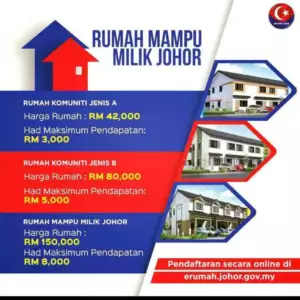
Before making an application with the Johor Housing System (SPJ), applicants are required to register with the SPJ public portal. To register, follow the steps below;
- Visit erumah.johor.gov.my
- On the main page of the portal, click Register Account Now. The User Category Options screen will be displayed.
- There are 4 user categories on the Individual Options screen. To register as an applicant, click the Individual (‘Individu’) icon. Then, the Account Registration Application Conditions screen will be displayed.
- After understanding the terms, click I Agree to continue registration. The account registration screen will be displayed.
- Applicants must complete the information as requested.
- Once done, click REGISTER.
- A successful registration notification screen will be displayed. On this screen, username and password information will be displayed.
- At the same time, an email will also be sent to the applicant using the registered email.
Portal Login
After completing the portal registration, the applicant is allowed to log into the portal. To log in, follow these steps;
- On the main page of the portal, click Log Into Account. The User Category Options screen will be displayed.
- Click on the Individual (‘Individu’) icon. The Individual Login screen will be displayed.
- Enter IC Number and Password.
- Then, click Login.
- The Update Personal Information screen will be displayed.
- Applicants need to update their personal information as follows:
- Update the Applicant’s Address information
- Update Additional Applicant Information
- Update Applicant’s Spouse Information
- After completing the updated information, mark the Applicant Declaration section.
- Then, click the SEND Button. A message will be displayed.
- Applicants need to click on Public Housing (‘Perumahan Rakyat’).
Apply for a house for rent
To apply for a government rental house, the applicant must follow the following steps;
- Click the People’s Housing Menu. The Rental House Application List screen will be displayed.
- To make a new application, click PERMOHONAN RUMAH SEWA (RENTAL HOUSE APPLICATION). The application conditions screen will be displayed. Click Saya Setuju (‘I Agree’) to continue the application. The Rental House Application screen will be displayed. On the Rental House Application screen, the applicant only needs to select the available Project Name.
- Then, complete the required Dependent Information.
- Click the Add Button (in green) to add another dependent. To delete, click the Cancel Button (in orange).
- When finished, click SAVE. An alert message will be displayed.
- Click Yes to submit the rental application. Rental house applications will be displayed on the Rental House Application List.
- If the application was unsuccessful, click Sebab (‘Reason’). The screen will show you why your application was unsuccessful.
Version: MY
cover image source: Rujukan.my
Is this your first time applying for Rumah Mampu Milik Johor? Don’t fret – we have a team of real estate professionals who are ready to help you with all of your property needs! Fill in your details below and an expert will get in touch with you shortly.
Continue reading:
