


| TL;DR iDsaya, a secure digital identity platform launched by the Malaysian government to modernize the property acquisition process. This system utilizes biometric facial recognition and public key infrastructure to create a verified “digital IC” for signing legal documents. eSPA (Electronic Sale and Purchase Agreement), on the other hand, is the official online contract framework within the Housing Integrated Management System (HIMS). As of January 1, 2026, the Ministry of Housing and Local Government (KPKT) has made eSPA mandatory, replacing traditional paper contracts. It standardizes housing agreements to prevent data manipulation and creates a transparent, error-free history of your property purchase from signing to stamping. |
Imagine you’ve finally found your dream home. You are ready to sign the papers, but instead of a thick stack of documents and a cramped hand, you get a notification on your phone.
This isn’t sci-fi anymore; this is the new reality in Malaysia.
With the government pushing for a fully digital ecosystem, the home-buying process is changing forever. But let’s be honest, “digital transformation” can sound scary. Is it safe? Is it legal? And what happens if you don’t jump on the bandwagon?
Here is the kicker: Starting January 1, 2026, the Ministry of Housing and Local Government (KPKT) requires that all housing Sales & Purchase Agreements (SPAs) be signed online. If you are planning to buy a newly launched property, you cannot ignore this.
In this guide, we will break down what iDsaya is, how the Housing Integrated Management System (HIMS) eSPA works, and walk you through the process step by step.
Key Takeaways
- iDsaya is your “Digital ID card” required to access government e-services.
- eSPA reduces human error and fraud by ensuring all contracts follow a standard, legally compliant format.
- Digital Signatures are legally binding under the Digital Signature Act 1997.
- Mandatory eSPA adoption is January 1, 2026.
Introduction to iDsaya & eSPA
1. What is iDsaya?
Think of iDsaya as your digital passport or NRIC online.
In the physical world, to verify your identity, you show your MyKad. In the online world, it’s hard to prove you are who you say you are. That is where iDsaya comes in. It is a secure mobile application that provides you with a verified digital identity.
Here is a simple example:
- The House: The online service you want to use (like signing a housing contract).
- The Key: iDsaya.
You cannot enter “The House” (the signing platform) without “The Key” (your verified iDsaya account).
According to Pos Digicert, the authority behind this technology, iDsaya uses PKI (Public Key Infrastructure). This ensures that when you sign something, the system knows 100% it was you, not a hacker or a copycat.
2. The New Normal: eSPA and HIMS
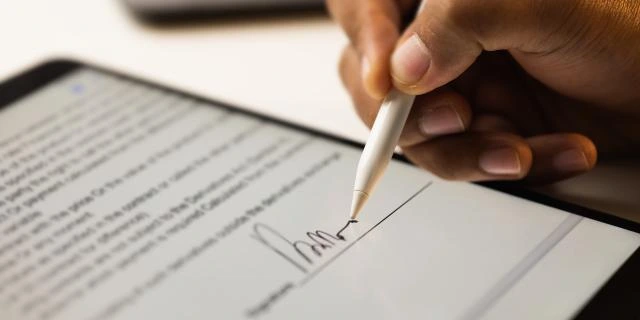
You will often hear the term eSPA thrown around. It stands for “Electronic Sales and Purchase Agreement.“
This isn’t just a PDF you sign with an iPad stylus. It is part of a massive system called HIMS (Housing Integrated Management System).
a. Why are we switching to eSPA?
Historically, buying a house involved piles of paper. This led to problems:
- Typos in buyer names (big headache for loans).
- Lost documents.
- Fake signatures.
With HIMS eSPA, the government ensures a “single source of truth.” This creates a clean digital history of the transaction. If the data says you own the unit, you own the unit.
This means the digital process links everything together: your ID, the signing, and the government stamping (tax).
3. Step-by-Step Guide: How to Sign Your eSPA Using iDsaya
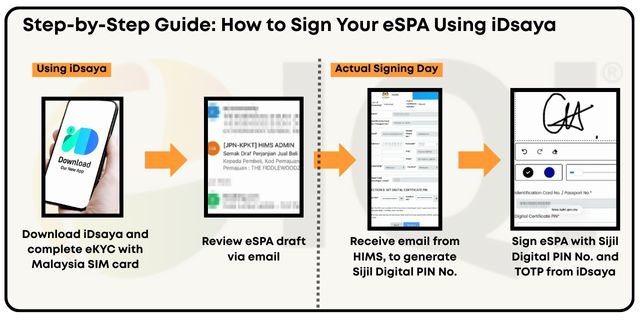
There are 2 Phases to access iDsaya and sign eSPA smoothly. To sign an eSPA, you need to register with iDsaya.
Phase 1: Registration for iDsaya
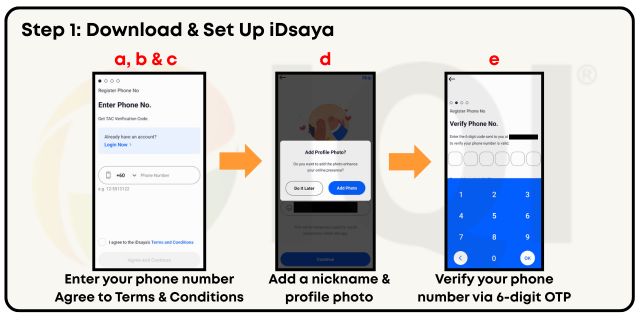
Step 1: Download & Set Up iDsaya
a) Download iDsaya from the Apple App Store or the Google Play Store.
b) Enter your phone number
c) Agree to the terms & conditions, and click “Agree and Continue”
d) Add a nickname and profile photo
e) Verify your phone number using the 6-digit OTP
Note: Each account can be used on only one device. To avoid repeating the eKYC process, select the device you want to use for eSPA signing.
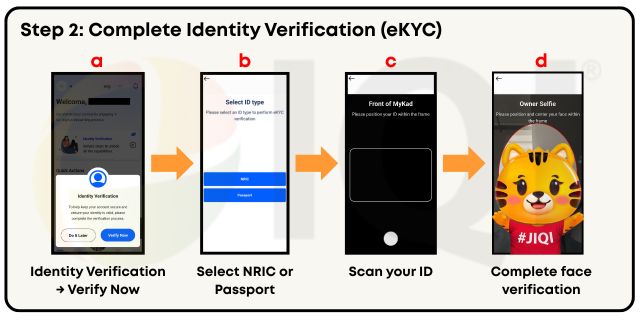
Step 2: Complete Identity Verification (eKYC)
a) Tap “Identity Verification“, and tap “Verify Now“
b) Select your ID type (NRIC or Passport)
c) Scan your ID (Malaysian citizen: scan front & back of NRIC)
d) Complete face verification by positioning your face in the frame
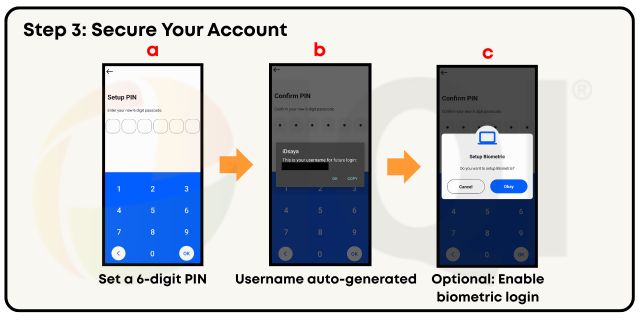
Step 3: Secure Your Account
a) Set up a 6-digit PIN ( used for login and signing)
b) Your username will be auto-generated (Your Ic number without the dash)
c) Optional: Enable biometric login (fingerprint / face ID) for faster access
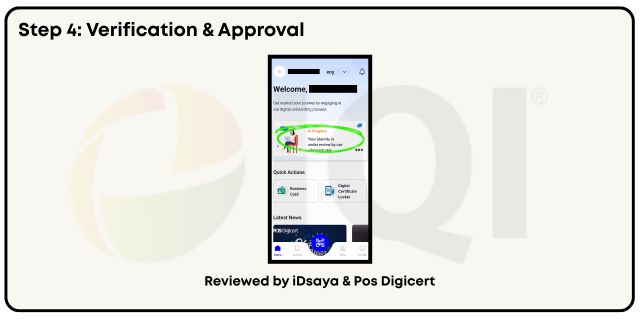
Step 4: Verification & Approval
a) Your details will be reviewed and validated by the system and Pos Digicert
b) Once approved, your iDsaya account is ready for eSPA signing
Note: Approval usually takes around 3 working days, depending on verification checks.
Step-by-step to Register iDsaya Video
Phase 2: Signing the Deal Using HIMS eSPA
Congratulations! You are ready to sign your eSPA! Follow the steps below to sign the eSPA and fully obtain the property in your name.
a) The Email Invite: You will receive an email from HIMS notifying you that the SPA is ready.
b) Review the Draft: Read the draft. Agree to the eSPA draft. After that, you will receive an email from HIMS and can generate your PIN. for the Digital Certificate.
c) Sign It: Sign the eSPA with a digital certificate PIN number and the TOTP (Time-based One-Time Password) generated by iDsaya.
d) Completion: The sequence usually goes
(1) Buyer → (2) Witness of buyer → (3) Landlord → (4) Witness of Landlord → (5) Developer → (6) Witness of the developer
e) Stamping: The developer applies for e-Stamping. Once the duty is paid, your eSPA is legally complete!
Step to Sign Your eSPA by using the HIMS eSPA Video
4. Is iDsaya Safe to Use?
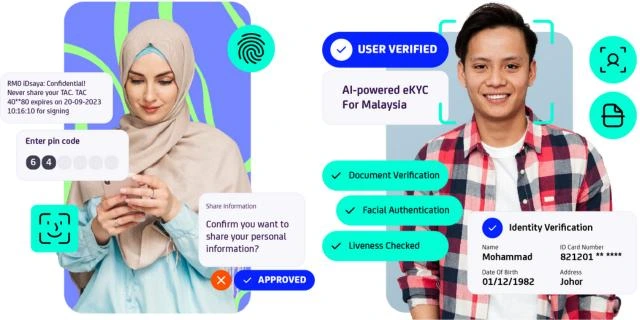
This is the number one question most Malaysians ask: “Can someone hack my ID and sell my house?”
The short answer is: No, it is actually safer than a handwritten signature.
Here is why, based on the Digital Signature Act 1997:
- Liveness Detection: To use iDsaya, you have to perform facial recognition. The app scans your face in 3D (liveness detection) to verify it’s a live human and not a photo of you.
- Tamper-Evident: Once you digitally sign a document using the Pos Digicert certificate, it becomes “locked.” If anyone changes even a single comma in the contract after you sign, the digital seal breaks, and the document becomes invalid.
- Legally Binding: Under Section 62(2) of the Act, a digital signature is just as powerful in court as a thumbprint or handwritten mark.
a. Comparison: Traditional SPA vs. eSPA
| Feature | Traditional SPA | eSPA |
|---|---|---|
| Signing Method | Hardcopy | Digital Signing |
| Verification | Witness looks at your IC | Verify through iDsaya with facial recognition |
| Security | Paper can be lost or forged | Encrypted, backed by PKI tech |
| Process Speed | Slow (manual courier) | Instant (online) |
| Audit Trail | Difficult to track | Recorded timestamps for every step |
5. Frequently Asked Questions (FAQs)
Is iDsaya a government official app?
Yes. It is a trusted platform recognized by the National Digital Identity Initiative. The underlying digital certificates are issued by Pos Digicert, the licensed Certification Authority in Malaysia appointed to support government initiatives such as HIMS.
Is it safe to sign property contracts using iDsaya?
Absolutely. It uses PKI (Public Key Infrastructure) technology. This is bank-grade security. If someone stole your phone, they would still need your face and your PIN to sign anything.
Can I sign an eSPA if I am currently outside Malaysia?
Yes! That is the beauty of digital signing. As long as you have your iDsaya app set up and verified (with your ID documents), you can use the Remote Security Measures to sign from anywhere in the world.
Can foreigners use iDsaya to sign an eSPA?
Yes. The eKYC process supports passport verification. However, to date, it supports only phone numbers from Taiwan (+886), China (+86), and Japan (+81). As a safer alternative, you may purchase a local number (+60) to verify.
Is eSPA mandatory for everyone?
By January 1, 2026, the full digital signing process will become mandatory. If you purchase a newly launched property after that date, you must use it.
Does the eSPA replace the traditional legal lawyer?
No. You still need a lawyer to advise you on the terms and act as a witness. The HIMS eSPA simply changes how the document is created and signed, making the process more efficient and secure. The lawyer’s role in due diligence remains vital.
Ready for a seamless, paperless property purchase? IQI Global leads the way in digital real estate. Our experts guide you effortlessly from finding your dream home to signing your eSPA securely. Start your search with IQI Global today!
Continue Reading
